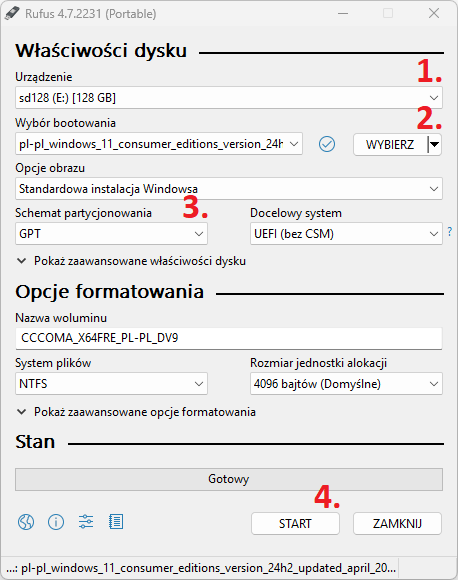
Rufus
https://rufus.ie < click here to download
Last supported version on Windows 7 this 3.22 and on Vista and XP 2.18 download here: https://rufus.ie/downloads/
* Note: the program formats the entire pendrive.
1. Select the flash drive.
2. Kliknij WYBIERZ i wskaż obraz .iso
3. If you don't intend to install the system under UEFI, switch to MBR. The rest of the settings will be selected automatically.
4. Click START.
* After selecting: GPT/UEFI - when the .iso image takes up a lot of space and does not fit on FAT32, Rufus automatically creates an NTFS partition for data and a FAT32 partition for boot.