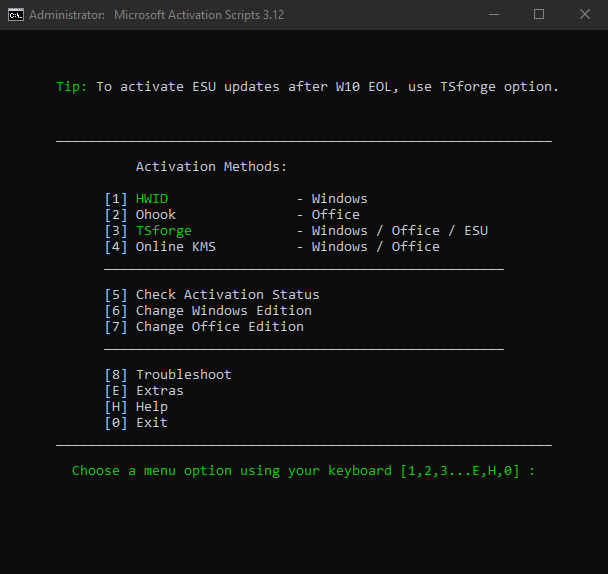
Microsoft Activation Scripts (MAS)
If you run the activator on Windows Vista you must have a minimum SP1 and install PowerShell 2.0 for download here
On Windows 7 and newer ones work immediately.
Download:
Before downloading, disable your antivirus (it may delete the file), enable it after activation.
1. Download link: MAS_AIO.cmd
2. Select: Method 2: Traditional
3. Click: MAS_AIO.cmd to download
Activation Windows (Vista, 7, 8, 8.1, 10, 11 / Server: 2008, 2008 R2, 2012, 2012 R2, 2016, 2019, 2022, 2025)
1. Run MAS_AIO and click 3 on your keyboard to select the method: [3] TSforge
2. Click 1 on the keyboard to select: [1] Activate - Windows
3. Wait for ”Press any key to Go back…” = activation completed.
Activation Office (2010 / 2013 / 2016 / 2019 / 2021 / 2024 / 365)
1. Run MAS_AIO and click 2 on your keyboard to select the method: [2] Ohook
2. Click 1 on the keyboard to select: [1] Install Ohook Office Activation
3. Wait for ”Press any key to Go back…” = activation completed.
Extension of support for Windows 10 until October 2028
1. Run MAS_AIO and click 3 on your keyboard to select the method: [3] TSforge
2. Click 2 on the keyboard to select: [2] Activate - ESU
3. Wait for ”Press any key to Go back…” = activation completed.
--------------------------------------------------------------------------------------------------------------
Other activation methods:
[1] HWID - activation permanently assigned to hardware for Windows 10 / 11
If you intend to use a different key in the future, use the TSforge method because it permanently assigns the key to the hardware and there may be problems with changing to a different key.
Activates even after reinstallation Windows from the Internet.
[4] Online KMS - old method activating for 180 days
Other features:
[5] Check Activation Status - Check activation status.
[6] Change Windows Edition - Change the Windows edition.
[7] Change Office Edition - Change the Office edition.